
Quarterly Blog #1 #ZoneOneWinter
Aim: 15mins
2/13/26: Friday
900words
Long Wharf
[[Primary Objective]]
[[Evolving with Fusion]]
[[Understanding through Experimentation]]
My intention with using Autodesk Fusion is to utilize and retain a lot of the mechanical design experiences that I have learned over the years. I genuinely think all programs are just tools, and we can get lost in utilizing a lot of these 3D programs (especially me), but at the end of the day, the real objective is showcasing what we’re making so it can be easily fabricated. For me, the last 3 months, while I have been experimenting on this site, RaihanFabricates.com, I have been experimenting because I genuinely want to retain the skills that I have been using. Thus, I want to retain and also evolve with what will be used more in the future, as that’s important for growth, the way I see it
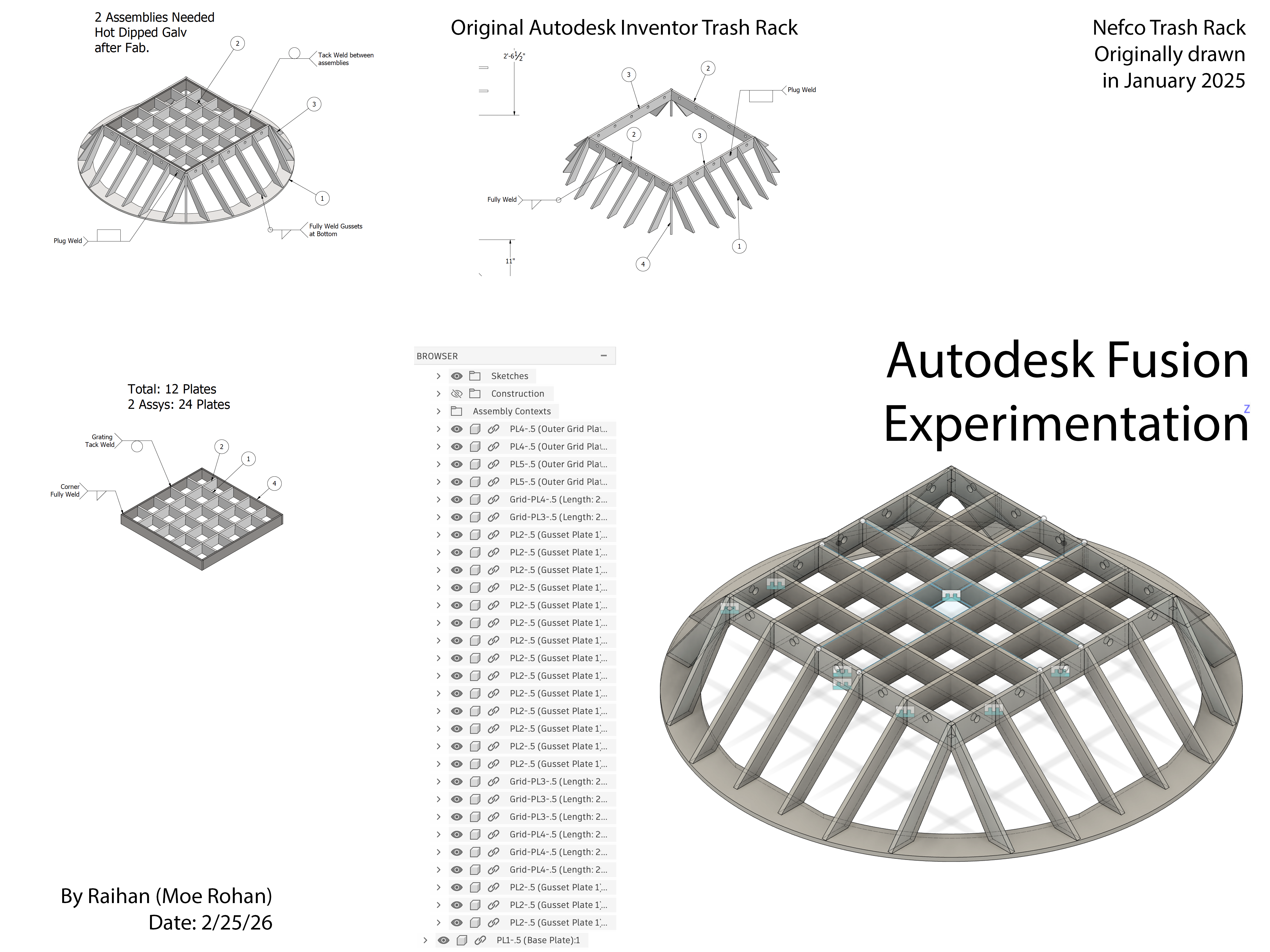
For me, Fusion really does combine a lot of things that I really appreciate about mechanical engineering programs. For this blog, I am going to showcase a trash rack drawing that I did, at Logan Steel. Although we never fully fabricated this, as it was drawing that never got full approval. This is a drawing of a trash rack, made out of steel components. There are square openings, and it’s a fabrication made out of a lot of components, that will at the end theoretically be fabricated, by the process of welding.
Initially, when I worked on this project, I was just really curious about making the assembly. For me, this is like a puzzle, where I showcase the process, thus, for me, my purpose is always what is the customer understanding, and how we can easily fabricate it. A really cool thing, that I learned, while using Autodesk Inventor, was it’s system of grouping assemblies together. Thus, for this project, I made 3 groupings, that pretty much showcases how the steel fabrication goes together. As I have shown a bunch of drawings and assemblies already, on this website, RaihanFabricates.com, I am going to start to transition my format on this site. Rather than just showcasing full drawings. For me, I want to also focus on the things that I am truly curious about. Thus, I want to explore specific avenues. Grouping in Solidworks/Inventor is very cool aspect of 3d mechanical design. And this process also correlates and is integrated very well in Autodesk Fusion as well.
For me, this is a different beast, compared to a lot of the architecture programs that I used back in the day, including programs such as Rhinoceros, and even Revit. I was always overwhelmed with a lot of the information that you can spontaneously create, for visual diagramming’s sake, but with mechanical programs, like Autodesk Inventor, it’s really cool to work on a piece, and show the process, in which we will eventually fabricate. And being able to group a large project, into its essential components, and then break it apart further, I genuinely appreciate this aspect of mechanical designing a lot.
There are a lot of codings for how to detail, specifically in Steel Detailing, but for me, I genuinely love the process of visually showcasing a lot of this, as I find 3d programs have advanced to a point where new experimentations are inevitable. So, although this project has a lot of pieces, I was able to easily showcase the process, by going in a system. The first first part was making the whole drawing of what I am fabricating, in 3d. Afterwards, I just slowly make it into further component assemblies, and then develop the said assemblies. I found this part to be really exciting, because I feel like you can make anything, and easily showcase the process, in Inventor. That’s why I was so fond of using Inventor, right after I left Logan Steel, back in the summer of 2025.
When I started using Solidworks, starting late summer of 2025, it was a similar process, but I still enjoyed how you can easily manipulate in Inventor. Though I did enjoy the S shortcut that I discovered in Solidworks. For me, being able to utilize and group this whole process, it was a really cool thing. Now, because I have been using Fusion for around 3 months, for this site, I can also group in a similar fashion. Though I’m still in beta phase, I’m liking what I’m seeing, as Fusion combines a lot of what I know, as it has the S shortcuts as well, also the grouping, which was an important component for me. And since, Autodesk is really investing on Fusion, I went for it, and nowadays I also really appreciate using Fusion as a tool, to make the kinds of drawings that I want.
I genuinely think it’s really cool how you can group different assemblies, and then slowly break it apart. The three groupings that I have, I’m using the initial Inventor drawings as reference, but this is easily done in Fusion as well, though it is taking me a little longer to learn all the quarks of how Fusion works. Though since I have been using it, I see a lot of similarities, in the translation process. Especially save and replace, for part files, and it’s really cool. Thus, I hope to showcase more of this, even if I don’t always finish the full drawing. And since I will be starting a new job at Mohawk Northeast, I wish to slowly just showcase the process of what I am learning, rather than just showing a full drawing. For me, this site is going to become ‘show you work’ site, and I hope to develop more of my drawing strategies as I move forward.